promptward
PromptWard







PromptWard is a Manifest V3 Chrome extension that catches PII in your prompts before it reaches ChatGPT, Claude, Gemini, Perplexity, or Mistral. Detection and redaction run entirely on-device via a local ONNX model plus deterministic heuristics — no prompt text, no placeholder map, and no telemetry ever leaves your machine.
Contents
- Features
- Supported sites
- Install from the Chrome Web Store
- Install (no build required)
- How it works
- Known limitations
- Privacy
- Development
- Changelog
- Acknowledgements
- License
Features
- Local detection, not a proxy. An ONNX token-classification model (Rampart) plus regex/checksum heuristics (SSNs, Luhn-validated card numbers, emails, phone numbers) run inside the extension — no request ever leaves the browser to classify your text.
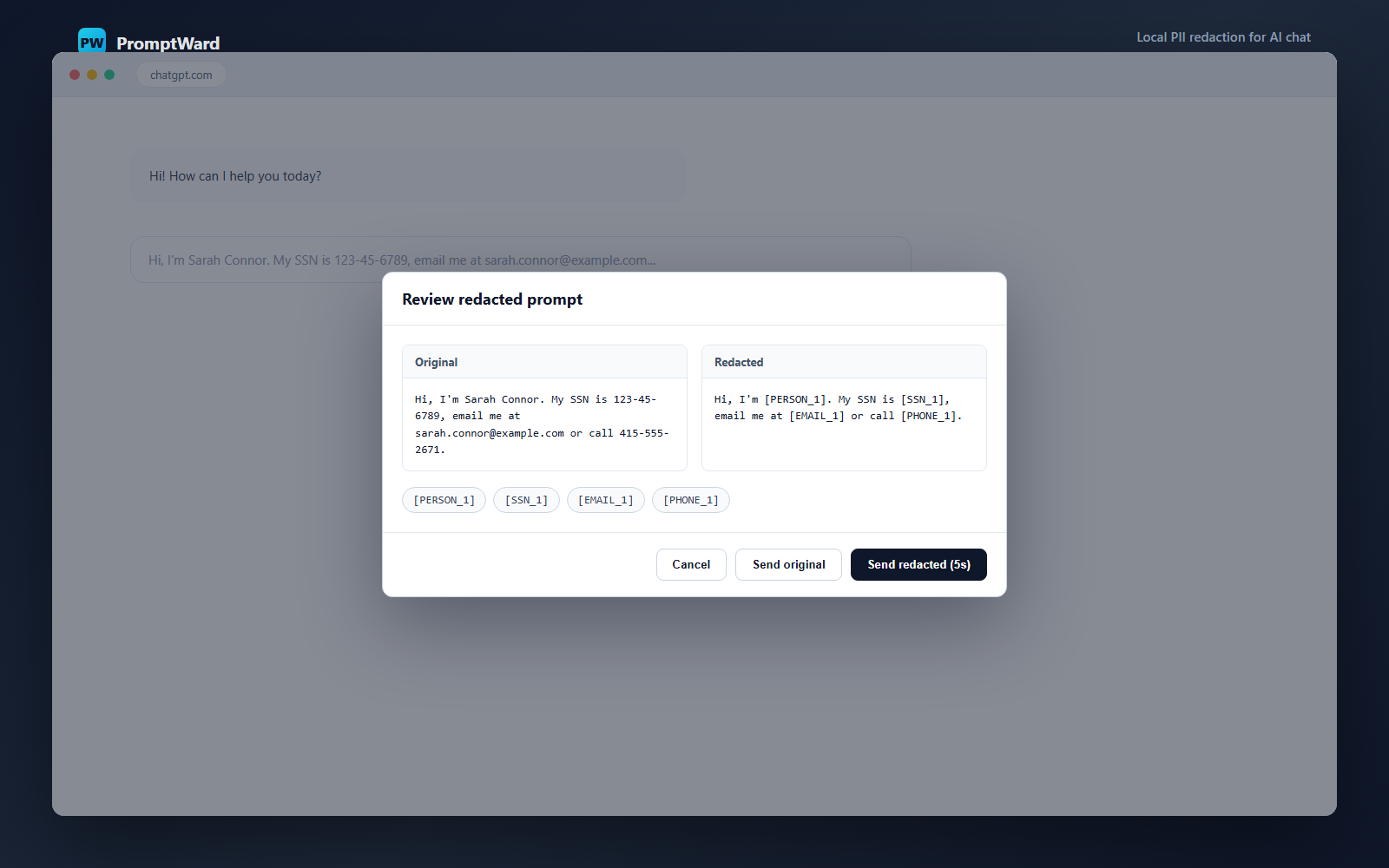
- Censor by default, never silent. A review modal shows original vs. redacted side by side. It auto-sends the redacted version after a 5-second idle timer (covers stepping away from the keyboard), with an explicit Send original opt-out and instant cancellation the moment you interact with the modal.
- Fail-closed on rich-text editors. Modern chat composers (Lexical, ProseMirror) keep their own internal document state; PromptWard verifies the redacted text actually landed in the editor before allowing a send, and blocks the send rather than silently letting unredacted text through if it can’t confirm.
- Local conversation reveal. On ChatGPT, Gemini, Perplexity, and Mistral, PromptWard can reveal protected values in rendered chat messages while the AI site’s DOM and native copy actions retain only tokens such as
[PERSON_1]. Values remain in extension memory only. - Bring your own domain. Add any site from the side panel’s Custom Domains list, not just the built-in five.
Supported sites
| Site | Domain |
|---|---|
| ChatGPT | chatgpt.com, chat.openai.com |
| Claude | claude.ai |
| Gemini | gemini.google.com |
| Perplexity | www.perplexity.ai |
| Mistral | chat.mistral.ai |
Install from the Chrome Web Store
The fastest way to get PromptWard: install it from the Chrome Web Store. Updates ship automatically, and it’s the same on-device detection as the source in this repo — no prompt text ever leaves your machine.
Install (no build required)
Prefer to sideload from a release zip instead? Follow these steps:
- Download the latest
promptward-extension.zipfrom Releases. - Unzip it somewhere permanent (don’t delete the folder afterward — Chrome loads the extension from it).
- Go to
chrome://extensions, enable Developer mode (top right). - Click Load unpacked and select the unzipped folder.
- Click the PromptWard icon in your toolbar to open the side panel; it loads the local model automatically the first time.
- Visit a supported AI chat site and send a prompt containing PII — PromptWard will show a redaction review before it goes out.
How it works
- A content script intercepts the send action (click or Enter) on the composer before the page’s own handler runs.
- The prompt text goes to a dedicated Worker, hosted in an MV3 offscreen document so it survives service-worker suspension, which runs the local ONNX model and heuristic detectors.
- If PII is found, a review modal shows original vs. redacted text; the redacted version auto-sends after 5 seconds of inactivity, or you can send the original / cancel.
- The extension writes the redacted text back into the composer — trying
execCommand, a synthetic paste event, and a select-all-then-beforeinputsequence in turn, since rich-text editors don’t all accept the same input signal — and only replays the send once it can verify the redacted text actually took.
Known limitations
- Detection is assistive, not a compliance or DLP guarantee: it can miss PII in unusual formatting and will occasionally flag harmless text.
- The redaction verify-and-fail-closed guard means an incompatible composer will block sends entirely (with a visible error) rather than leak PII — safer, but you’ll need to report the site if that happens.
- Local reveal is available on the built-in validated chat adapters, is memory-only, and deliberately preserves placeholders for native selection and copy. It is not enabled on custom domains or Claude until its authenticated DOM fixture is validated.
Privacy
See PRIVACY.md for the full data-handling posture, and NOTICE.md for third-party model/runtime attribution (Rampart model, ONNX Runtime Web).
Development
npm install
npm run vendor:rampart
npm run vendor:ort
npm test
npm run build
Load dist/ as an unpacked Chrome extension.
Local model constraint
- Rampart model files are packaged under
public/models/rampart/. - ONNX Runtime Web WASM files are packaged under
public/ort/. - Runtime remote model loading is disabled in
src/rampart-worker.ts. models/**andort/**are intentionally not listed inweb_accessible_resources.
Versioning
The release number lives in VERSION and is the single source of
truth — package.json, the extension manifest (src/manifest.ts), and
APP_VERSION (src/shared/debug.ts) must all equal it, enforced by a test.
Bump all four together with:
npm run bump-version -- 0.11.0
(Don’t hand-edit one source — reloading the unpacked extension will silently
show the old number in chrome://extensions if the manifest version drifts.)
Changelog
See CHANGELOG.md for release history. Current release: 0.10.1.
Acknowledgements
PromptWard’s local detection is built on the Rampart model from National Design Studio — client-side PII redaction for AI assistants, announced here.
License
PromptWard’s own code is MIT licensed. The vendored Rampart model (CC-BY-4.0) and ONNX Runtime Web assets carry their own separate licenses — see NOTICE.md.